Skip to content

RedShift CO2 Laser Initial Parameter Reference Table
Before You Use This Table
This reference table is a companion resource to CO₂ Laser Cutting: Why Parameter Tables Fail.
The values listed here are starting points, not universal standards. Even machines with the same wattage can produce very different results because of differences in optics, assist gas setup, motion system behavior, and material variability.
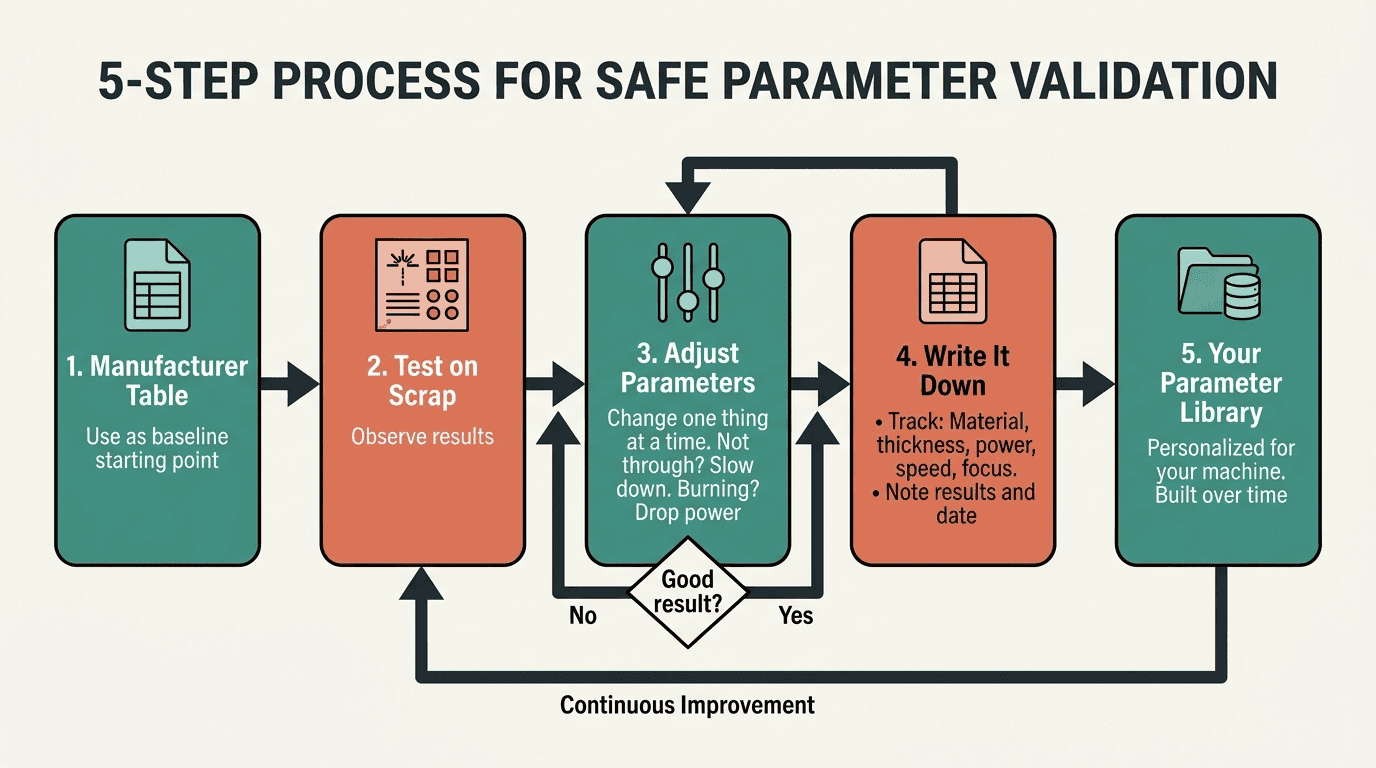
Before moving into production, always run test cuts on scrap material from the same batch. If you are new to laser parameter setup, read the main guide first to understand why direct copying between machines often fails and how to validate settings safely.
All speeds are in mm/s. Initial power percentages are based on a 60W–100W range.
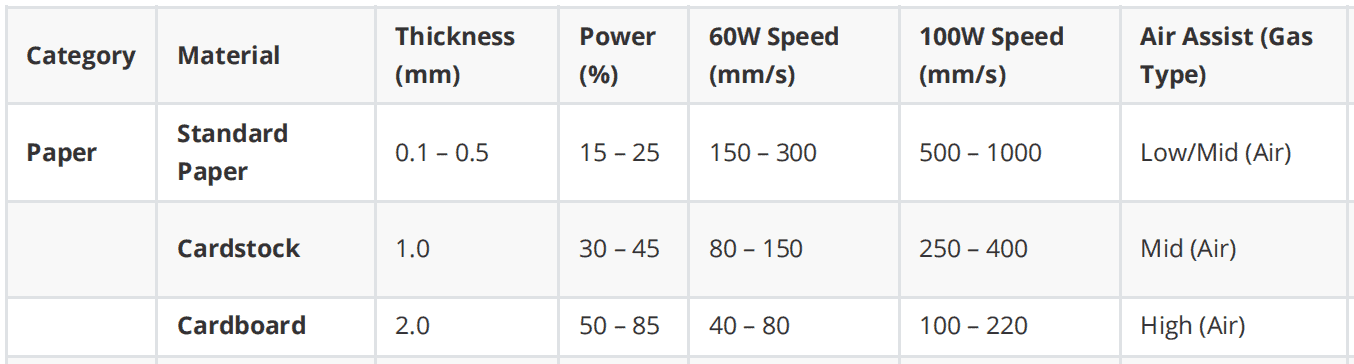
| Category | Material | Thickness (mm) | Power (%) | 60W Speed (mm/s) | 100W Speed (mm/s) | Air Assist (Gas Type) | Process Notes |
|---|---|---|---|---|---|---|---|
| Textiles | Polyester/Sub. | 0.5 – 1.0 | 20 – 40 | 200 – 300 | 350 – 500 | Low (Air) | Edges will melt-seal; avoids fraying. |
| Denim | 1.0 | 20 – 40 | 150 – 200 | 250 – 300 | High (Air) | High pressure prevents surface scorching. | |
| Felt | 2.0 | 50 – 85 | 80 – 100 | 130 – 150 | High (Air) | Power depends on density and wool %. | |
| Leather | Natural Leather | 1.0 – 2.0 | 45 – 70 | 15 – 25 | 30 – 45 | High (Air) | Strong exhaust required for heavy odor. |
| Rigid Leather | 3.0 – 4.0 | 85 – 90 | 10 – 20 | 20 – 30 | High (Air) | Veg-tanned leather requires slower speeds. | |
| Paper | Standard Paper | 0.1 – 0.5 | 15 – 25 | 150 – 300 | 500 – 1000 | Low/Mid (Air) | High Fire Risk. Use high speeds. |
| Cardstock | 1.0 | 30 – 45 | 80 – 150 | 250 – 400 | Mid (Air) | Based on 210-300 GSM standards. | |
| Cardboard | 2.0 | 50 – 85 | 40 – 80 | 100 – 220 | High (Air) | Crucial for suppressing flare-ups. | |
| 4.0 | 80 – 90 | 15 – 30 | 40 – 80 | High (Air) | Speeds <40mm/s may cause heavy char. | ||
| 6.0 | 85 – 95 | 8 – 15 | 50 – 60 | High (Air) | Consider multiple passes for 60W. | ||
| Plastics | Acrylic (PMMA) | 3.0 | 55 – 85 | 15 – 20 | 25 – 35 | Low (Air / $N_2$) | $N_2$ provides cleaner, polished edges. |
| 5.0 – 6.0 | 70 – 85 | 7 – 10 | 13 – 16 | Low (Air / $N_2$) | $N_2$ prevents oxidation/yellowing. | ||
| 10.0 | 85 – 95 | 2 – 4 | 5 – 7 | Low (Air / $N_2$) | Requires 4" Lens. | ||
| Delrin (POM) | 1.0 – 3.0 | 50 – 80 | 30 – 45 | 60 – 85 | High (Air) | Engineering plastic; cuts very cleanly. | |
| Wood | Plywood / MDF | 3.0 | 60 – 85 | 12 – 20 | 25 – 45 | High (Air) | Core glue significantly affects speed. |
| 5.0 – 6.0 | 70 – 90 | 8 – 12 | 15 – 20 | High (Air) | Use high pressure to reduce charring. | ||
| 10.0 | 85 – 98 | 3 – 5 | 8 – 12 | High (Air) | Requires 4" Lens; knots may obstruct. | ||
| Denim | 1.0 | 20 – 40 | 150 – 200 | 250 – 300 | High (Air) | High pressure prevents surface scorching. | |
| Felt | 2.0 | 50 – 85 | 80 – 100 | 130 – 150 | High (Air) | Power depends on density and wool %. | |
| Leather | Natural Leather | 1.0 – 2.0 | 45 – 70 | 15 – 25 | 30 – 45 | High (Air) | Strong exhaust required for heavy odor. |
| Rigid Leather | 3.0 – 4.0 | 85 – 90 | 10 – 20 | 20 – 30 | High (Air) | Veg-tanned leather requires slower speeds. |
Special Guidance for Industrial-Grade Systems (130W – 150W)
For 130–150 W CO₂ lasers, start from the same percentages but increase speed by 30-50% for thin materials (<3mm) and 20% for thick materials, and always run test cuts first.
Final Operational Reminders
- The 15% Rule: Never set power below 15%; most tubes will not fire consistently below this switching point.
- Safety First: Always monitor the machine. High-pressure air is essential for suppressing fires in wood and cardboard.
- Lens Focus: Ensure the beam is consistently focused; inconsistent focus leads to uneven cuts regardless of the gas used.
Optimization Strategy
- Mandatory Verification: Before processing a full workpiece, execute a 5x5 mm test square on scrap material.
- Speed-First Adjustment: To prevent fire, always favor higher speeds during initial testing. If the material does not cut through, reduce the speed in 10% increments rather than maxing out the power.
- Documentation: Material properties (like wood moisture or leather tanning) vary by batch. Record your successful settings for each specific supplier.
Hardware & Process Tips for Thick Materials
- Lens Choice: Use a 2.5" lens for precision on thin items (<6mm) and a 4" lens for anything over 10mm to ensure the beam remains straight through the material.
- Air Assist: High pressure (compressor) is mandatory for wood and thick foams to blow out embers and prevent fires. Low pressure is preferred for acrylic to avoid disturbing the molten "flame-polished" edge.
- Engraving: For detailed engraving (e.g., anodized aluminum or glass), use lower power (15-20%) and high speeds (300-500 mm/s).