Skip to content

You’ve invested in a beautiful, expensive leather hide, ready to create a batch of high-end products with your CO2 laser. You dial in the settings and run the first cut—it's perfect. But just a few inches away on the same hide, the next cut is a disaster. It's either charred and burnt or not cut through at all. Frustrated, you start tweaking the power and speed, but the results remain maddeningly inconsistent, wasting precious material and killing your production efficiency.
The secret to perfect, repeatable laser-cut leather isn't found in a single set of machine parameters; it's in understanding and managing the material's natural inconsistency. A single hide varies dramatically in density and fat content from the dense spine to the soft belly. The key to success is material grading: testing different zones of the hide, batching similar pieces together, and adjusting settings accordingly. This systematic approach, not a "magic number," is how professionals achieve scalable, high-quality results.

As an expert at Redshift Laser for the past five years, this is a problem I help clients solve almost weekly. A new manufacturer, often someone with a background like my client John, will call me, convinced their machine is faulty. They fixate on the laser's precision but don't see the real challenge: the leather itself. I once worked with a company making wallet components. Their failure rate was nearly 30% because they treated a whole cowhide as a uniform sheet. I explained that true expertise isn't in programming a cool design; it's in mastering material grading. Once they started batching cuts from the spine separately from the belly, their quality became consistent. Let’s dive into how you can do the same.
What Are the Best Leather Goods to Make with a Laser?
You've seen the potential of laser technology on leather, but you're not sure which products are actually profitable. You can cut or engrave almost anything, but what will customers pay a premium for? You need to move beyond simple test squares and identify high-value ideas that can build a real business.
Without a clear market focus, you risk creating an inventory of beautifully crafted items that nobody wants to buy. The key is to leverage the laser's strengths—precision, personalization, and the ability to create intricate details. By focusing on applications where these strengths are highly valued, you can create products that stand out and command a higher price, turning your laser from a hobbyist tool into a profit center.
The best and most profitable laser-cut leather goods are high-value, customizable items that are difficult to make with traditional tools. Top ideas include personalized wallets and watch straps, custom-branded keychains and corporate gifts, intricate jewelry like earrings and bracelets, and bespoke patches for bags and jackets. These applications succeed because they combine the timeless appeal of leather with the modern precision and personalization that only a laser can offer.

Personal Accessories
This category is all about personalization. A wallet is just a wallet, but a wallet with a laser-engraved monogram or a meaningful phrase becomes a unique keepsake. Lasers can also cut intricate patterns for watch straps or create perfectly stitched holes that would be tedious to do by hand.
- Products: Wallets, passport holders, watch straps, belts, journal covers.
- Value Add: Monograms, custom text, intricate cut-out patterns.
Corporate and Promotional Goods
Businesses are always looking for unique, high-quality promotional items. Leather goods feel premium and have a high perceived value. A laser-engraved keychain or coaster with a company logo is far more memorable than a cheap plastic pen. It's a great market for B2B sales.
- Products: Keychains, luggage tags, coasters, mousepads, portfolio covers.
- Value Add: Flawless logo engraving, custom shapes, bulk personalization.
Fashion and Apparel
Lasers open up incredible opportunities in fashion. You can create unique patches with sealed edges that are ready to be sewn onto jackets or bags. You can also cut extremely intricate patterns directly into leather panels for high-fashion garments or accessories, creating a look that is impossible to achieve with die-cutting.
- Products: Custom patches, intricate jewelry (earrings, bracelets), decorative garment panels.
- Value Add: Complex shapes, fine details, non-fraying edges.
| Application Area | Profit Margin | Scalability | Customization |
|---|---|---|---|
| Personal Accessories | High | Medium | Very High |
| Corporate Goods | Medium-High | High | Medium |
| Fashion & Jewelry | High | Low-Medium | Very High |
| Simple Patches | Medium | Very High | High |
How Do You Prepare Leather for Laser Cutting?
You have your design and your leather. It seems simple enough: place the hide in the machine and press "start." But this is a critical mistake that leads to skewed cuts, smoke stains, and inconsistent focus, wasting expensive material.
Failing to prepare your material properly undermines all the work you put into your design and settings. An uneven surface will cause the laser to go in and out of focus, leading to incomplete cuts. Smoke from the engraving process can permanently stain the leather's surface, ruining the look of the finished piece. Proper preparation is a quick process that protects your material and ensures the final quality meets a professional standard.
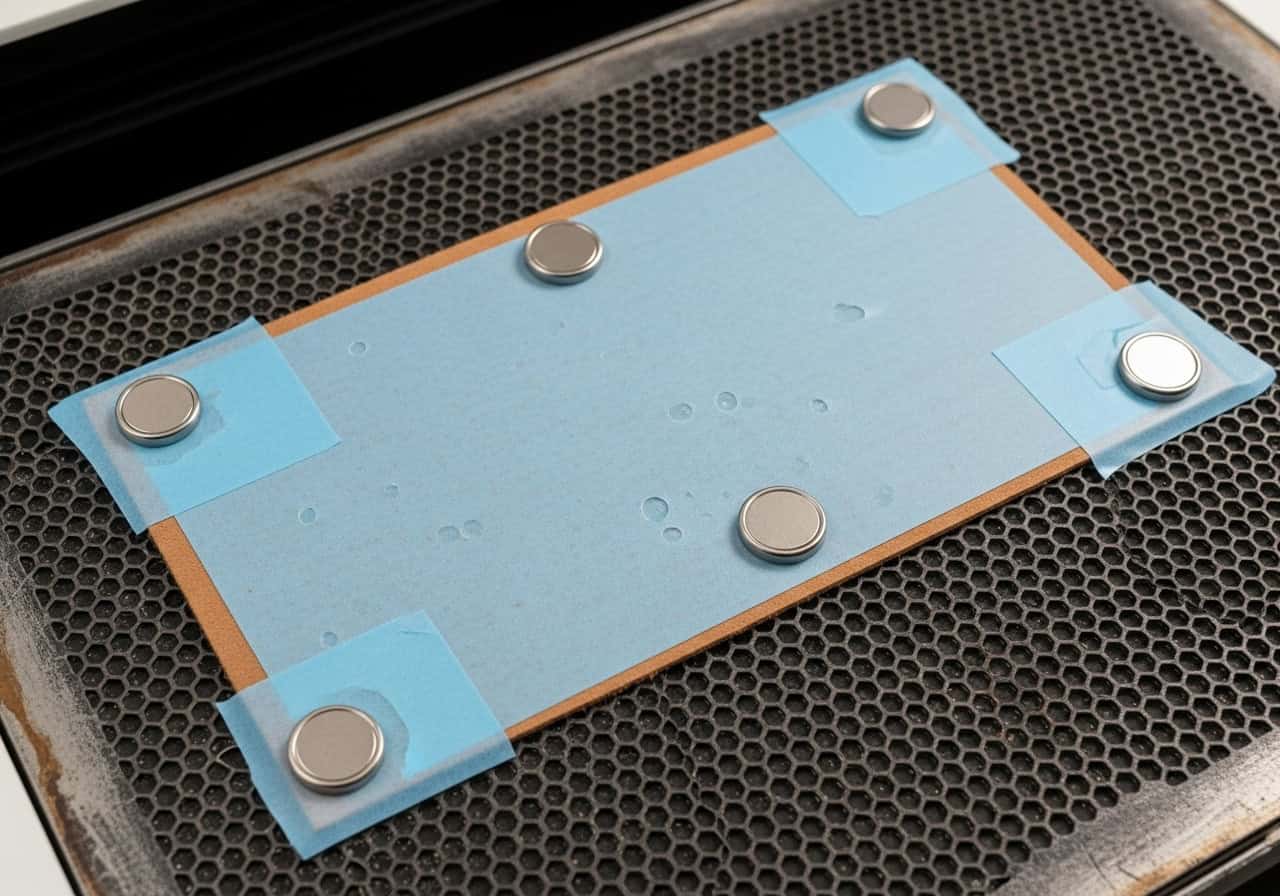
Properly preparing leather for laser cutting involves three key steps. First, ensure the leather is clean and dry. Second, flatten the material completely on the laser bed using weights or strong magnets to prevent any waves or curls, which would alter the laser's focus. Third, apply a layer of medium-tack transfer tape or paper masking over the surface. This masking protects the leather from smoke stains and residue, peeling off after the job is complete to reveal a perfectly clean surface.
Cleaning the Surface
Start with a clean slate. Gently wipe the leather with a soft, dry cloth to remove any dust or debris. For tougher spots, a slightly damp cloth can be used, but make sure the leather is completely dry before it goes into the laser. Any moisture can interfere with the laser's energy and cause inconsistent results.
Securing the Material
This is the most critical preparation step. Leather, especially from a roll or a folded hide, rarely lies perfectly flat. Even a small wave of a few millimeters can throw the laser out of focus.
- Honeycomb Bed: Use strong neodymium magnets placed around the edges of your workpiece to pull it taut against the metal bed.
- Vector Grid: Small, heavy weights (metal bars work well) can be placed outside the cutting area to hold the leather down.
Masking for Protection
Laser cutting and engraving leather produces a lot of smoke and oily residue. This residue will settle back onto the surface of the leather, creating a "smoky halo" around your design.
- How to Apply: Smooth a sheet of paper-based application tape (transfer tape) over the entire work area. Use a squeegee to ensure there are no air bubbles.
- The Benefit: The laser will cut through the tape and the leather. When you're done, you simply peel the tape off, and all the smoke stains come off with it. It leaves you with a perfectly clean engraving and cut edge.
What is the Step-by-Step Process for a Perfect Cut?
You've prepared your material, but now comes the moment of truth. You need a reliable method for finding the right settings, especially considering the leather's inconsistency. Just guessing at the power and speed is a recipe for failure.
Without a systematic process, you're gambling with every cut. You'll either overpower the laser and get a thick, ugly char line, or underpower it and have to finish the cut with a knife, defeating the purpose of using a laser. A methodical testing process removes the guesswork, allowing you to find the ideal parameters for the specific piece of leather you are working with, ensuring a clean, precise, and repeatable result.
The process begins with material grading: cutting a small test pattern on different parts of the hide (spine, belly, shoulder) to find the optimal settings for each zone. Secure the masked leather and run your test file using high speed and low power, gradually increasing power until it cuts cleanly. Once settings are dialed in for a specific zone, batch all your parts for that zone. Always use air assist to reduce charring and run the job from the bottom up to prevent smoke from staining finished parts.

Step 1: Material Grading and Testing
This is the professional secret. Don't assume one setting works for the whole hide. Use a small test file—a 1-inch square with a small circle inside is perfect.
- Test on the Spine: This area is dense. Cut your test file here and record the settings that give you a clean cut.
- Test on the Belly: This area is softer and fattier. Cut the same test file. You will likely find it requires significantly less power.
- Create Zones: Based on your tests, mentally divide your hide into zones of similar density and plan to cut all parts for one zone at a time.
Step 2: Set Your Origin and Focus
Place your graded and batched leather piece on the bed, ensuring it is flat and masked. Set the origin point for your job in a way that maximizes material usage for that zone. Use your machine's focus tool to set the correct distance between the nozzle and the leather surface.
Step 3: Use Air Assist and Order Your Cuts
Strong air assist is essential. It blows vaporized leather particles away from the cut, dramatically reducing flare-ups and charring. In your software, set the job to run from the bottom up. This ensures that smoke from the area currently being cut is drawn away from the parts that are already finished.
Step 4: Run the Job and Clean Up
Execute the laser job. Once complete, leave the exhaust fan running for a minute to clear any remaining fumes before opening the lid. Gently peel away the masking tape to reveal your clean, perfectly cut pieces. Some light residue may remain on the cut edges, which can be wiped away with a soft cloth.
What Are Some Final Tips for Laser Cutting Leather?
You have the process down, but what are the inside tips that will save you time and money in the long run? How do you choose the right type of leather, and what should you absolutely avoid putting in your laser?
Knowing a few final pro tips can make a huge difference in your workflow and the quality of your finished products. This knowledge helps you avoid costly mistakes, like using chrome-tanned leather which releases hazardous fumes, and helps you select materials that will give you the best possible result. These small details are what separate good results from great ones.
Always choose vegetable-tanned leather for the best and safest results, as it engraves with beautiful contrast. Avoid chrome-tanned leather at all costs, as it contains chromium salts that release toxic and corrosive fumes when burned. Keep your laser's optics clean, as leather produces an oily residue that can quickly coat your lens and mirrors, reducing power and performance. Finally, remember that less power is often more; aim for the lowest power setting that will reliably cut through to get the cleanest edge.

Tip 1: Choose Vegetable-Tanned Leather
This is the best choice for laser work. It's tanned using natural tannins from plants, and it reacts beautifully to the laser, producing a dark, clean, and high-contrast mark. Its engraving quality is second to none.
Tip 2: DANGER: Avoid Chrome-Tanned Leather
Much of the upholstery and apparel leather available is chrome-tanned. When heated, the chromium salts in this leather can release carcinogenic and highly corrosive hexavalent chromium gas. This is extremely dangerous to your health and will rapidly corrode the metal parts of your laser machine. If you don't know what kind of leather it is, do not cut it.
Tip 3: Clean Your Optics Frequently
The oils and resins vaporized from leather can quickly create a sticky film on your laser's mirrors and focusing lens. This film absorbs energy, reducing your machine's cutting power and potentially cracking your lens. Clean your optics with proper lens solution and wipes after every long session of cutting leather.
Tip 4: Less Power is More
The goal is a clean cut, not a burnt one. A wider char line on the edge means you are using too much power. Always strive to use the highest speed and lowest power combination that will consistently cut through your material. This minimizes the heat-affected zone1 and gives you a much cleaner, more professional-looking edge2.
Conclusion
The art of laser cutting leather lies in mastering the material, not just the machine. While the precision of a laser is a powerful tool, it's the understanding that a single hide is a landscape of different properties that unlocks true scalability and quality. By embracing a process of material grading, systematic testing, and proper preparation, you can move past the frustration of inconsistent results. You can tame the natural variability of leather and produce thousands of identical, high-quality pieces. This is the approach that transforms a craft into a successful, modern manufacturing business.